startposting vs. Photoroom for product posts
Photoroom is an image tool, and a very good one — its background removal is the benchmark this category is measured against. It finishes the picture. What it does not do is decide what the post says. If the part that costs you the afternoon is the caption, the hashtags and the headline, that is the part we built — and it comes back in seconds, with no prompt to write and nothing to lay out.
Last updated 16 September 2026. Photoroom pricing, credit allowances and export limits read from Photoroom’s own public pricing page on 28 July 2026, from a US connection.
Start free — 3 posts, no cardstartposting.
Photoroom
The short answer
Choose Photoroom if your bottleneck is images — a catalogue to cut out, fifty listings to restage, marketplace photos that have to be clean and consistent. It batches, it works on your phone, and its cutout is better than ours.
Choose startposting if your bottleneck is posts — you already have a decent photo and what stops you publishing is deciding what to say. Image, headline, caption and hashtags come back together, in seconds, from three questions — no prompt to write, nothing to lay out, and editing is a headline tweak rather than a design session.
The real difference is where each tool stops. Photoroom hands you a finished image. We hand you something you can publish.
Definitions first
What each one actually is.
Photoroom
An AI visual production tool for e-commerce. It removes backgrounds, retouches, restages products in generated scenes, adds shadows, and exports at volume — up to fifty images in a batch. It started as the best background remover on a phone and grew outwards from there.
The cutout is genuinely excellent. A graphic designer on Capterra puts it better than our marketing could: “The ease by which we can edit and cutout a dress in an instant is amazing.” We are not going to pretend otherwise, and you should not choose us because you think we do that part better.
startposting.
Does one thing: you upload one real product photo, answer three questions — where it is being posted, what vibe you want, what the post is for — and you get back a restyled image with a headline, a caption and hashtags. No canvas, no preset to pick, no prompt to write.
We are not a better image editor than Photoroom. We are a different unit of work. Photoroom’s output is an asset. Ours is a post.
Side by side
Compared on where each one stops.
What it finishes
- startposting.
- The post
- Photoroom
- The image
Time to a PUBLISHABLE post
- startposting.
- Seconds
- Photoroom
- Image in under a minute — the post is still yours to write
Prompt writing
- startposting.
- None — three questions
- Photoroom
- None — presets and tools
Editing after generation
- startposting.
- A headline tweak
- Photoroom
- A workspace you drive
Starts from your real product photo
- startposting.
- Yes — the whole scene restyled by AI
- Photoroom
- Yes — cut out and restaged
Background removal
- startposting.
- Built in, every plan
- Photoroom
- Built in, every plan — and it is excellent
Writes the caption
- startposting.
- Yes
- Photoroom
- No
Writes hashtags
- startposting.
- Yes
- Photoroom
- No
Text on the image
- startposting.
- Generated headline, editable
- Photoroom
- Not its strength — a reviewer's complaint
Batch processing
- startposting.
- No — one photo at a time
- Photoroom
- Yes, up to 50 images
Mobile capture and editing
- startposting.
- No — web only
- Photoroom
- Yes, mobile-first
Decides what the post says
- startposting.
- Yes — from three answers
- Photoroom
- You do
How usage is metered
- startposting.
- One meter: posts
- Photoroom
- Two: AI credits and exports
Unused allowance expires
- startposting.
- Never
- Photoroom
- Monthly allowances
API for catalogues
- startposting.
- No
- Photoroom
- Yes — billed separately
Free tier output
- startposting.
- 3 full posts, no watermark, no card
- Photoroom
- Watermarked, not licensed for commercial use
Headline price requires annual commitment
- startposting.
- No — monthly is the list price
- Photoroom
- Yes — every tier reads per month, billed yearly
Four of those rows go to Photoroom on the merits. That is not modesty — it is the shape of the answer. If you are buying an image tool, buy the better image tool. The rows that come to us are all the same row wearing different clothes: the words.
Show the working
How we compared them.
Every Photoroom price, credit allowance and export limit on this page was read from their own public pricing page on 28 July 2026, from a US connection — because pricing pages localise, and a figure read from the wrong country is wrong for you even when it is right for us. Every figure below carries that date so you can check it yourself against whatever their page says today.
Quotes about Photoroom come from published reviews on Capterra, verbatim, including the ones that flatter them. One honest caveat: that listing carries 4.6 out of 5 from sixteen reviews. Sixteen is a handful, not a survey. We are quoting individual users, and we are telling you the sample size so you can weigh it yourself rather than reading “reviewers say” and assuming thousands.
We have no customer testimonials to show you, because we do not have customers yet. Rather than borrow a trust badge we have not earned, the page shows real output from our own product and cites other people’s published words about theirs.
The seam
Where a finished image stops.
Here is the part most comparisons in this category miss. Photoroom is fast. You can have a clean, well-lit, professionally staged product image in well under a minute, and it will look better than anything you would have shot on a kitchen table. That is not the problem.
The problem is what happens next. You have the image open, and you still have to decide what this post is about. What the headline says. Whether the caption opens with a question or a claim. Which nine hashtags are worth using this week and which are dead. Whether the tone matches the last four posts. Sellers do not stall on the picture — they stall staring at an empty caption box with a perfectly good image already sitting in it.
That gap is the whole reason this page exists — and the cost of it is time. Photoroom saves you the minutes that were never the problem. The twenty that were — writing, sizing, second-guessing — are untouched. Ours come back in seconds along with the image, which is the only comparison of speed on this page that means anything. It is also not a gap Photoroom is failing to close by accident. Their own published comparison pages benchmark them against Photoshop, Picsart, Pixelcut, Claid, Midjourney and Gemini. Every one of those is an image tool. It is a category talking entirely to itself about images, and the seller’s actual job — publish something today — sits outside all of it.
Made with startposting
What startposting. gives you back.
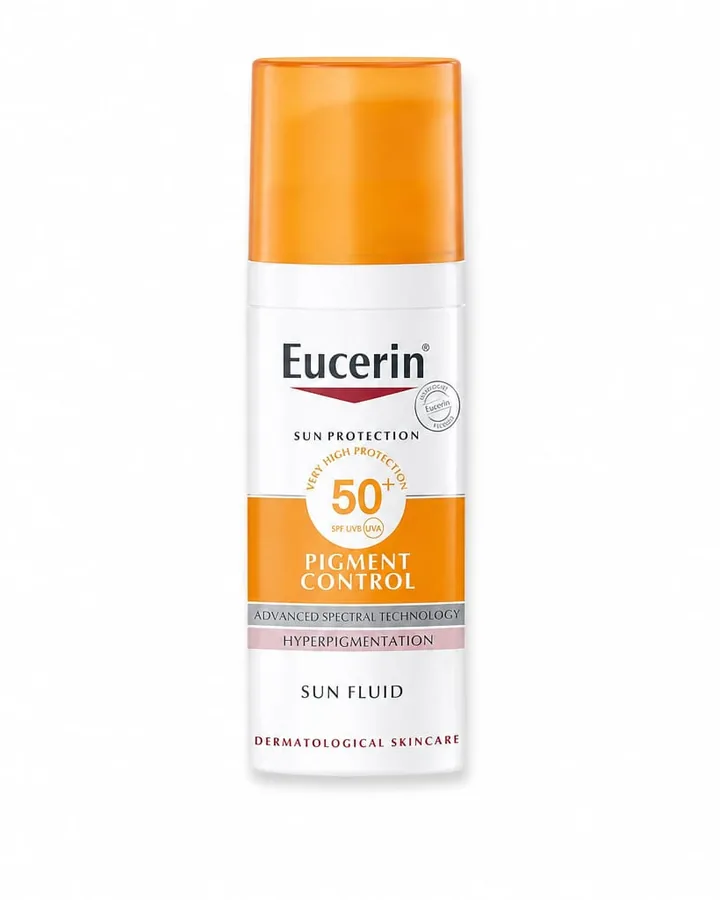
Unedited output from our own tool, not stock and not a mock-up — a seller’s real photo on the left, what startposting. sent back on the right. Each one took seconds and no prompt: three questions, and this came back. The model started from the seller’s photo and was held to the product, which is why the bottle and the can are recognisably the ones that went in. The images are made by AI and they are not photographs. Photoroom keeps your product’s own pixels by cutting it out — that is a genuine advantage when the label has to be exact. A prompt-based generator starts from nothing of yours at all.
Before
After — ready to post

caption + hashtags written with the image — nothing left for you to fill in.
Before

After — ready to post

caption + hashtags written with the image — nothing left for you to fill in.
What a still image cannot show you is the other half of what came back: a headline, a caption written for the platform, and the hashtags. That is what is in the download.
The gap
The caption gap.
Photoroom does not write captions or hashtags. This is not a criticism — it is an image tool and it never claimed otherwise. But it is the single largest practical difference between these two products, and any comparison that buries it is not being useful.
Text on the image itself is a related, smaller gap, and their own users raise it. A CEO reviewing Photoroom on Capterra lists as a con: “Lacking have tools to put text over the pictures”. We generate a headline onto the image and leave it editable, because a product post with no words on it is a photograph, not an ad.
To be exact about what you get from us: one image, one headline burned into it, one caption written for the platform you named, and a hashtag set. Four things, one action. With Photoroom you get the first one, faster than we do, and the other three are yours.
Their strongest answer
Batch, and what fifty images gets you.
The best argument against this page is batch, so here it is stated properly rather than hidden. Photoroom processes up to fifty images at once. Upload a folder of product shots, get a folder of clean staged images back. We process one photo at a time. For a catalogue, that is not a close call — it is the difference between an afternoon and a coffee break, and it is why we would tell a seller with two hundred listings to use Photoroom.
The answer is not that batch is bad. It is that fifty images is not fifty posts. You now have fifty finished pictures and fifty empty caption boxes, and the work you were trying to avoid has been reordered rather than removed. Batch solves the part that was already fast.
These are different jobs and they are both real. Catalogue work is a batch problem. Posting three times a week is a words problem. Most sellers have both.
Straight answer
Where Photoroom is genuinely better.
Four things, and none of them is a throwaway. If any of them is what you are choosing on, the rest of this page does not matter.
Background removal
Their cutout is the category benchmark and ours is not. It is the thing they built first and it shows. If precision on hair, fabric edges or transparent packaging decides it for you, that decides it.
Batch
Up to fifty images in one pass. We do one. For catalogue and marketplace work this is the whole ballgame.
Mobile
Photoroom is mobile-first — you can shoot and finish on a phone, standing at the stall. We are web only. If your workflow happens on your phone, that is a real gap on our side.
Volume per pound
Pro gets you up to 8,000 AI credits and 1,000 exports a month. Our Pro plan is 30 posts. If you are counting images, they win on volume by an order of magnitude and it is not a fair fight.
One more, in fairness to their users rather than to them: a graphic designer on Capterra does note that “Sometimes the AI backgrounds are not clean and looks low quality” — but that is about generated scenes, which is a different feature from the cutout, and generated scenes are exactly the thing we also do. We are not going to use a complaint about a feature we share as a point against them.
Money
Pricing, side by side.
Read from Photoroom’s own public pricing page on 28 July 2026, from a US connection. Two things about that table are worth knowing before you compare the headline numbers.
Photoroom
- Pro
- $7.50/mo billed yearly · up to 8,000 AI credits · 1,000 exports
- Max
- $20.99/mo billed yearly · up to 25,000 credits · 3,000 exports
- Ultra
- $82.50/mo billed yearly · up to 75,000 credits · 10,000 exports
- Enterprise
- Custom
- Free
- Watermarked, and not licensed for commercial use
startposting.
- Pro
- $14/mo · 30 posts
- Seller
- $29/mo · 100 posts
- Brand
- $79/mo · 300 posts
- Studio
- $249/mo · 1,000 posts
- Free
- 3 full posts, no watermark, no card
Annual billing is two months free. Unused posts never expire. A failed generation returns its credit automatically.
Every Photoroom tier is an annual price
Each one reads “Per month, billed yearly” on their own table. The $7.50 is a year paid up front. Month to month, Pro is $12.99 — much closer to our $14, though still buying you far more images.
Two meters, not one
AI credits and exports run down separately. You can have thousands of credits left and no exports, or the reverse. API usage is billed separately again, pay as you go. We meter one thing — posts — and they do not expire.
The honest read on price: per image, Photoroom is dramatically cheaper and no amount of framing changes that. The question is whether you are buying images. Thirty finished posts a month with the words written is a different purchase from eight thousand credits, and if what you needed was the eight thousand credits, buy those.
The decision
Which one should you use.
Use Photoroom if
- you have a catalogue to process, not a post to publish
- cutout precision is what you are judging on
- you work from your phone
- you need volume of images per pound
- your images go on marketplace listings, where captions are not the job
- you already write your own captions and like doing it
Use startposting. if
- the caption is what stops you posting, not the photo
- you want the headline, caption and hashtags written with the image
- you post to social several times a week
- you do not want to think about which meter you are spending
- you would rather buy finished posts than raw images
- your product labels have to stay readable
Not either/or
These two overlap less than they look like they do.
Canva and Photoroom compete with each other. We compete with neither of them for the same minute of your day. The split that actually makes sense:
Photoroom for the catalogue — batch cutouts, marketplace listing images, anything where you need fifty clean pictures and no words.
startposting for the calendar — the posts you owe Instagram this week, where the image is half the job and the caption is the half you keep putting off.
If you only have budget for one and your products already photograph reasonably well on a clean surface, we would put the money on the one that closes the loop. If your photos are the weak link, fix the photos first — with Photoroom.
Questions
The things people ask before choosing.
Is startposting's background removal better than Photoroom's?
No, and we would rather say so than have you find out. Photoroom's cutout is the benchmark in this category — it is what built the company and reviewers praise it unprompted. Ours is built in on every plan and it is good enough for the finished post it goes into. If background removal accuracy is the thing you are choosing on, choose Photoroom.
So what does startposting actually do that Photoroom does not?
It decides what the post says. Photoroom hands you a finished image and the caption, the hashtags and the headline are still your problem. We generate all four together from one photo and three answers, so the thing you download is publishable rather than half-done.
Does Photoroom write captions?
No. It is an image tool and it is explicit about that — its own comparison pages benchmark it against Photoshop, Picsart, Pixelcut, Claid, Midjourney and Gemini, which are all image tools too. Captions are outside the job it set out to do.
Photoroom is $7.50 a month and you are $14. Why?
That $7.50 is the annual-commitment price shown as a monthly figure — their own pricing table reads per month, billed yearly on every tier. Month to month, Photoroom Pro is $12.99. But the more useful answer is that you are not buying the same thing: 8,000 AI credits buys you a lot of images, and 30 posts buys you 30 finished posts with the words written. If you need volume of images, Photoroom is better value and it is not close.
Can I use both?
Yes, and plenty of sellers should. Photoroom for catalogue work, batch cutouts and anything going on a marketplace listing; startposting for the weekly social posts where the caption matters as much as the image.
What is the two-meter thing?
Photoroom meters AI credits and image exports separately — Pro is up to 8,000 credits and 1,000 exports a month, verified on their pricing page on 28 July 2026. The two run down at different rates, so you can have plenty of one and none of the other. We meter one thing: posts. A post is an image plus its caption and hashtags, and unused posts do not expire.
Do I need to write prompts for either?
Neither tool needs prompt engineering, which is a genuine point in both their favour against the DIY route. Photoroom gives you tools and presets; we ask three questions — where it is being posted, what vibe you want, what the post is for — and derive everything else from the answers.
Is the product in the output real?
Both tools start from your real photo, which is what a text-to-image generator cannot do — prompt-based tools invent the product, so labels, logos and shapes come out as guesses. Photoroom cuts your product out and restages it, so the product pixels are your photo. We give the model your photo and it re-renders the whole image, held to your product: it is an AI image, not a photograph, and you check it before posting. We set out exactly what is generated on our AI disclosure page.
Does startposting do batch?
No. Photoroom does up to 50 images at once and we do one photo at a time. If you are processing a catalogue, that difference decides it. Our answer is not that batch is bad — it is that fifty images is not fifty posts, and the part that takes the afternoon is the words.
Can startposting post to Instagram for me?
Not today. You download the image and the caption and post them yourself. Neither tool publishes for you — Photoroom does not schedule either, so on that axis we are equally incomplete.
Keep reading
Try it on one product.
Three posts free, no card.
Start freePhotoroom is a trademark of its respective owner. startposting is not affiliated with, endorsed by, or sponsored by Photoroom. Comparisons reflect publicly available information at the date of publication.