startposting vs. Canva for product photos
Canva is a design editor. startposting is a post generator. If you want control over every element on the canvas, Canva is better at that and it is not close. If you want a finished post — image, caption and hashtags — from one product photo without opening an editor at all, that is the thing we built.
Last updated 16 September 2026. Canva pricing and features verified from Canva’s own US pricing page on 28 July 2026.
Start free — 3 posts, no cardstartposting.
Canva
The short answer
Choose Canva if you need one tool for everything — social posts plus print, packaging, presentations and video — or if scheduling and team collaboration matter more to you than the time each post takes.
Choose startposting if you sell physical products, you have more listings than hours, and you want the caption and hashtags written for you rather than just the image.
The real difference is not output quality. It is whether you are doing the design work. Canva gives you tools; we give you a finished post.
Definitions first
What each one actually is.
Canva
A general-purpose design tool with over 1.6 million free templates and a very large stock library. You bring an idea, pick a template, and assemble the result — photos, text, layout, colours. It covers social posts, but also presentations, packaging labels, print flyers and business cards. Around 6 million teams use it. For most small businesses it is the default, and for good reason.
Canva is not a competitor to a post generator. It competes with doing the design yourself, and it wins that comparison comfortably.
startposting.
Does one thing: you upload one real product photo, answer three questions — where it is being posted, what vibe you want, what the post is for — and you get back a restyled image with a caption and hashtags. No canvas, no template to pick, no prompt to write.
It starts from your actual product. The AI restyles the scene around it and is held to your product’s shape, label and colours — the result is an AI image, not a photograph, and you check it before you post.
Side by side
Compared on the job, not the feature list.
What it is
- startposting.
- A post generator
- Canva
- A design editor
Time from photo to postable
- startposting.
- About a minute
- Canva
- 15–30 minutes
Starts from your real product photo
- startposting.
- Yes — the scene is restyled around it by AI
- Canva
- You place it, then stage it yourself
Writes the caption
- startposting.
- Yes
- Canva
- No
Writes hashtags
- startposting.
- Yes
- Canva
- No
Design skill needed
- startposting.
- None
- Canva
- Some — templates carry you, taste does the rest
Removes the background
- startposting.
- Built in, every plan
- Canva
- Pro feature, $18/mo
Output sized per placement
- startposting.
- Automatic
- Canva
- Magic Resize, on Pro
Schedules and publishes
- startposting.
- No
- Canva
- Yes, on Pro
Formats beyond social
- startposting.
- No
- Canva
- Print, packaging, presentations, video
Team collaboration
- startposting.
- No
- Canva
- Yes, on Business
Unused credits expire
- startposting.
- Never
- Canva
- Monthly AI quota
If a generation fails
- startposting.
- Credit returns automatically
- Canva
- —
Free tier
- startposting.
- 3 posts, no card
- Canva
- Generous, but no background removal
Read that honestly and it says something simple: Canva does far more than we do, and we finish the one job it leaves you holding.
Method
How we compared them.
We are one side of this comparison, so here is exactly what the claims rest on.
- Canva pricing and features were read from Canva’s own US pricing page on 28 July 2026, not from third-party summaries. That matters — several published guides still call Canva’s mid tier “Teams”, and Canva prices and names its tiers differently by country.
- Quotes about Canva are from published, verified reviews on G2 and Capterra, quoted verbatim with nothing trimmed to change the meaning. Several are from reviewers who rate Canva highly — follow either link and check them.
- The 15–30 minute figure is not our measurement of Canva. It comes from what Canva users themselves report about their own workflow — including one who describes finishing in 30 minutes as a large improvement.
- Every image on this page is a real output of our own product. Nothing here is stock photography or decorative AI imagery.
Where Canva is better, this page says so plainly — there is a whole section on it below. A comparison page that finds no merit in the alternative is not a comparison.
The time cost
Where the twenty minutes actually goes.
The interesting evidence about Canva’s speed does not come from critics. It comes from people who like it.
“I can finish my entire work within 30 minutes.”
That is a real improvement, and it is why people love the product. It is also thirty minutes, per batch, forever. For a seller with forty listings, that is the whole problem.
The template is fast. What is not fast is everything around it:
- 1Staging the shot — so it does not read as a phone photo on a kitchen counter — background, surface, light direction.
- 2Cutting the product out — which on Canva means the background remover, and that is a Pro feature at $18 a month.
- 3Resizing for each placement — a 1:1 feed post, a 9:16 story, a Pinterest pin — three exports, three crops.
- 4Writing the caption — somewhere else entirely, because Canva does not write one.
- 5Finding hashtags — also somewhere else.
Steps one through three are design work. Steps four and five are not design work at all — they are the reason the post exists, and the editor cannot help with either.
Made with startposting
What startposting. gives you back.
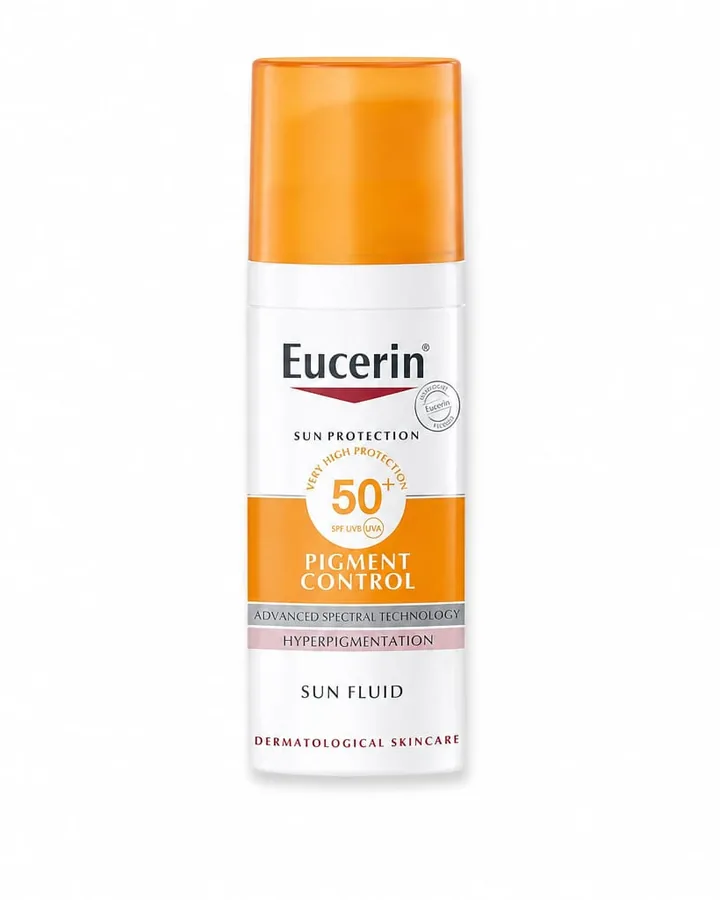
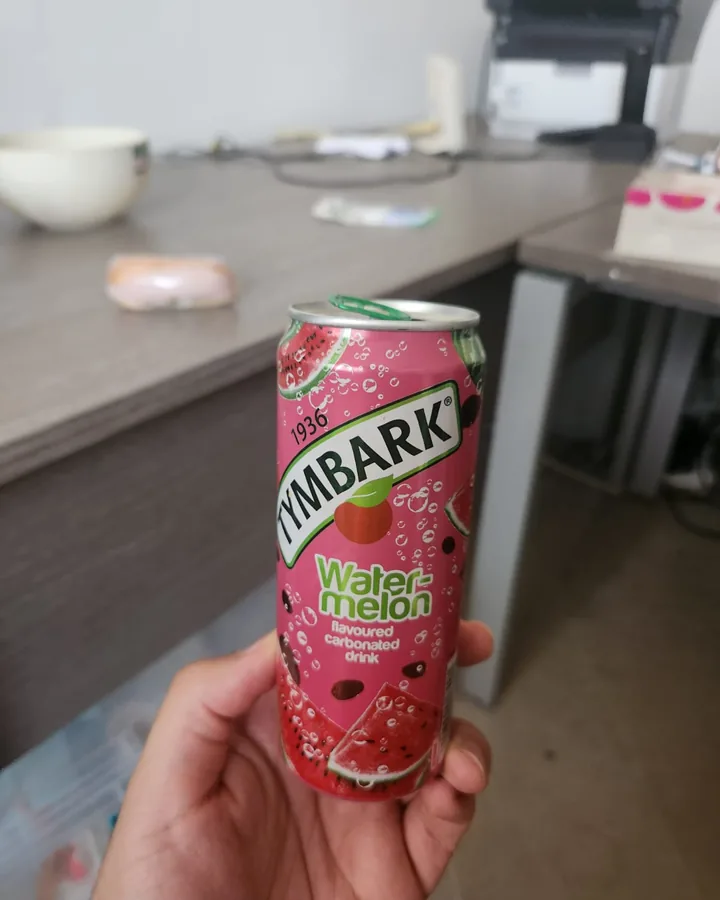
Left is what the seller actually uploaded — a phone shot or a flat pack image, no retouching. Right is what startposting. sent back: image, headline and caption together, in seconds, from three choices and no prompt. These are real outputs from our own tool, not mockups and not stock.
Look at the product itself in each pair. It is recognisably the same bottle and the same can — because the model started from the seller’s photo rather than from a description. The images are made by AI and they are not photographs.
Before
After — ready to post
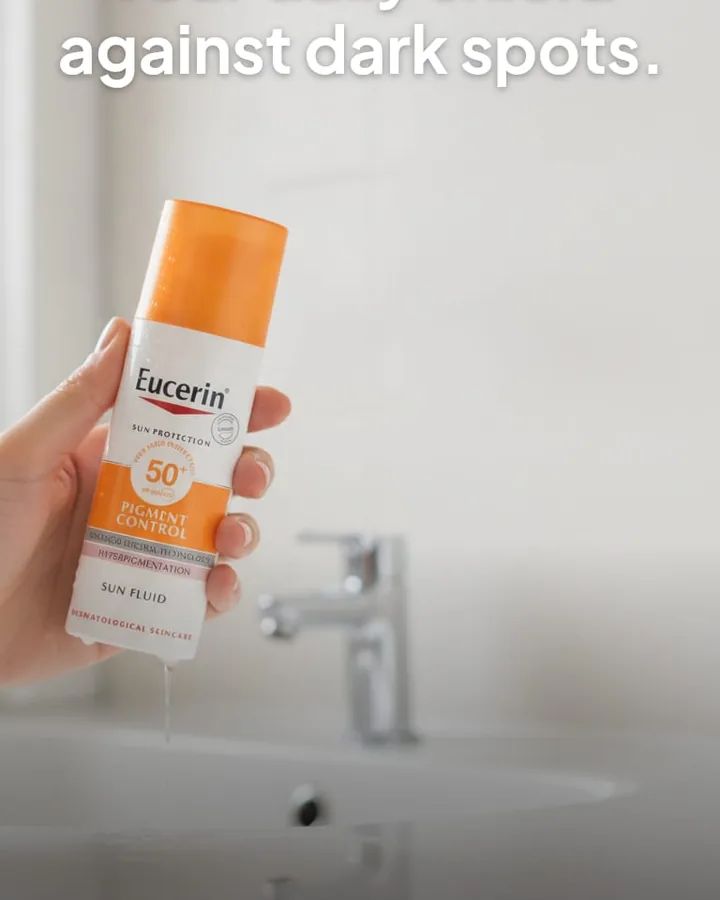
caption + hashtags written with the image — nothing left for you to fill in.
Before
After — ready to post
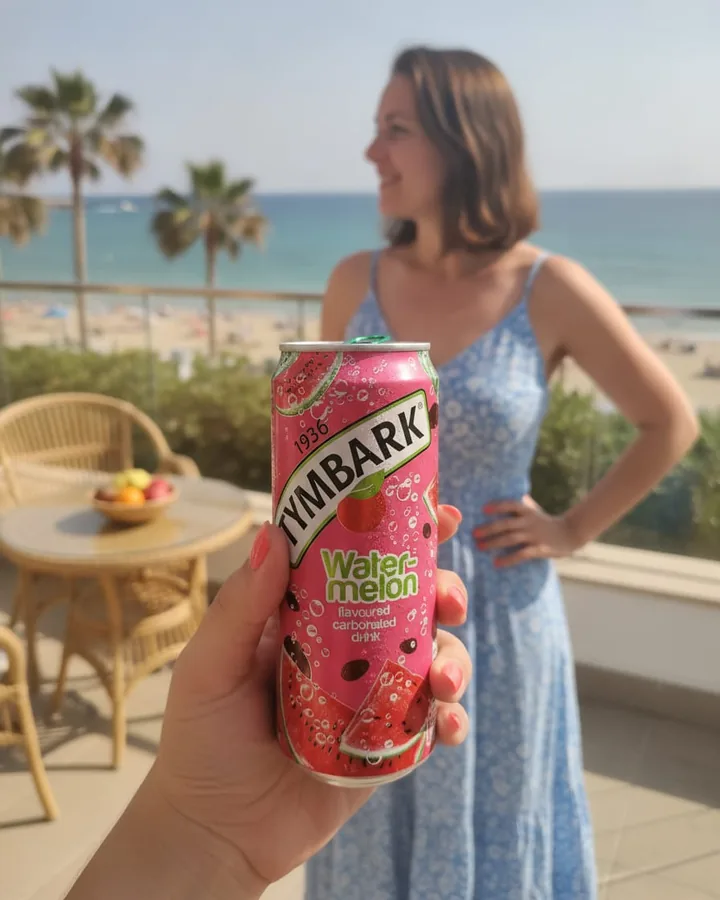
caption + hashtags written with the image — nothing left for you to fill in.
Every one of these took one upload and three choices. In Canva, the right-hand image is the part you would build by hand — and the caption above it is not something Canva writes at all.
Your first three posts are free, and you do not need a card to see one.
Start freeThe half nobody compares
Canva does not write the caption.
Almost every comparison of design tools stops at the image, which is odd, because the image is only half a post. A product post needs a hook, a body, a call to action and a hashtag set — and those have to match the image they sit under.
In Canva that is a second tool and a second context switch. In startposting the caption comes out of the same three choices that produced the image, so the tone of the words and the mood of the scene agree by construction rather than by effort.
What you get with the image
- A headline
- A short caption and a long caption
- A call to action
- A matched hashtag set
- An editable text overlay
Why it is bundled, not a separate step
Because the caption written by a tool that has never seen the image is a generic caption. Ours is derived from the same inputs — the placement, the vibe and the goal — which is why a launch post and a restock post do not read the same way.
The trade-off
Where the templates run out.
Canva’s library is its greatest strength and its most common complaint — and again, the complaint comes from people who like the product.
“if you lean on them too much your stuff ends up looking like everyone else's”
“designs that feel similar or less unique unless you put in extra effort to customize them”
“the AI image generator can be hit or miss”
The template is the speed; the sameness is the price. For a maker whose whole positioning is that the product is not mass-produced, a feed that looks templated works against the thing being sold.
The note about AI images points at something more specific. Text-to-image tools invent the product from a description, which is why labels, logos and lettering come out wrong. We took the other route: the model starts from your photo and is held to your product while it restyles the scene. It still re-renders the image, so we do not promise a perfect label — we promise a starting point that is your product, and we tell you to check it.
The honest part
Where Canva is genuinely better.
It schedules and publishes
Canva's Content Planner posts straight to Instagram, Facebook and Pinterest from inside the editor. We hand you a finished post; you still post it yourself. Worth knowing: scheduling is a Pro feature at $18 a month — the free tier does not include it.
Bulk Create is a real answer at scale
If you have built a template and your product data is in a spreadsheet, Canva will generate dozens of on-brand posts in one pass. That is genuinely fast. It also requires you to have built the template and to have the spreadsheet — which is why it does nothing for one photo you took ten minutes ago.
It covers everything, not just social
Packaging labels, print flyers, business cards, presentations, video. If you are a bakery that needs menu inserts and jar labels as well as an Instagram feed, that is one subscription instead of two tools.
It is built for more than one person
Real-time co-editing, shared brand kits, comment and approval flows — that is the Business tier at $25 per person per month. The moment a VA or a partner touches your account, it matters. We are single-user.
Full creative control
If you have a specific layout in your head, Canva can build it and we cannot. We trade control for speed on purpose, but that trade is not right for everyone.
It is free, and you already know it
Any paid tool is arguing against free and familiar. That is a fair objection and we would rather you weigh it than not hear it from us.
Pricing
What each one costs.
Canva figures are US pricing, billed monthly, checked 28 July 2026. Canva prices and even names its tiers differently by country, so check your own.
Canva
- Free
- — 1.6M templates, up to 200 Standard AI uses
- Pro
- — $18/mo per person
- Business
- — $25/mo per person
startposting.
- Free
- — 3 posts, no card
- Pro
- — $14/mo, 30 posts
- Seller
- — $29/mo, 100 posts
We are cheaper than Canva Pro. That is true and it is the least interesting thing on this page. $14 against $18, and Canva Pro does a hundred things we do not. If you need those things, spend the $18.
The honest comparison is against Canva Free — that is what most small sellers actually use. And it is worth knowing what the free tier leaves out: background removal, resize and translate are Pro features. A seller on free Canva staging a product photo cannot remove a background at all.
Two things about how we bill that are unusual in this category: unused posts never expire — a slow month costs you nothing, the balance carries forward — and if a generation fails, the credit comes back automatically. You do not file anything or email anyone.
The decision
Which one should you use.
Use Canva if
- you want control over the canvas
- you need print, packaging or presentations too
- you want scheduling built in
- someone else works in your account
- you post occasionally and the free tier covers you
- you have a specific layout in mind
Use startposting. if
- you have more products than time
- you want the caption and hashtags written, not just the image
- you do not want to learn or maintain a template system
- your product photos are real and need to stay real
- the design step is the part you dread
- you post several times a week
Not either/or
Most sellers will use both.
We are not asking you to cancel anything, and a page that told you to would be selling rather than comparing. The split that makes sense in practice:
startposting for the weekly grind of product posts — the ones where the job is to get a good image and a good caption out the door quickly.
Canva for everything with a specific layout in your head, and everything that is not a social post: labels, menus, flyers, decks, thumbnails.
If the free tiers of both cover you, use the free tiers of both. That is a legitimate answer and it costs you nothing.
Questions
The things people ask before switching.
Can't I just use Canva's Bulk Create?
If you have already built a template and your product details are in a spreadsheet, yes — and it works well. It will not help with the photo you took this morning, because there is no template built for it yet and no row in a sheet. Bulk Create is for scale once the system exists. startposting is for when you do not want to build the system.
Does startposting replace Canva?
No. It replaces the twenty minutes you spend in Canva making one product post. Everything else Canva does — print, packaging, presentations, collaboration, scheduling — Canva still does better, and we do not do at all.
Do I need to write prompts?
No. You make three choices: where it is being posted, what vibe you want, and what the post is for. Everything else — lighting, palette, camera angle, caption tone, hashtags — is derived from those three answers.
Is the product image real or AI-generated?
The image is made by AI and it is not a photograph. What differs is where it starts: text-to-image tools begin from a description, so labels, logos and shapes come out as guesses. We begin from your photo and hold the model to your product while it restyles the scene — then you check the result before posting. We set this out in full on our AI disclosure page rather than leaving you to find out.
Can startposting post to Instagram for me?
Not today. You download the image and caption and post them yourself. If scheduling is essential to your workflow, Canva does it on the Pro tier and startposting does not do it at all.
What if I do not like the result?
Try another vibe. It is another post from your balance, and the balance does not expire. If a generation actually fails, the credit returns automatically — you do not file anything.
Is startposting cheaper than Canva?
Our entry paid plan is $14 a month against Canva Pro at $18, but that is not a fair like-for-like: Canva Pro does a great deal we do not. The more honest comparison is against Canva's free tier, which most small sellers use. Against free, the question is whether the time a finished post saves you is worth $14 a month.
Do I need design skills to use startposting?
No, and that is the point of the three-choice setup. Canva's templates carry a lot of the design load too, but you still choose the layout, place the product, match the colours and decide when it looks finished. Those judgement calls are the part that takes the twenty minutes.
Can I edit the result?
The text overlay is editable, so headlines and captions can be adjusted after generation. The scene itself is not a canvas — if it is not right, you generate another one. That is the trade: less control, far less time.
What kinds of products does this work for?
It is built for physical products a seller can photograph — candles, skincare, jewellery, ceramics, baked goods, boutique fashion. Anything where the product itself has to stay recognisably the thing you sell.
Keep reading
Try it on one product.
Three posts free, no card.
Start freeCanva is a trademark of its respective owner. startposting is not affiliated with, endorsed by, or sponsored by Canva. Comparisons reflect publicly available information at the date of publication.