The short answer
- Scheduling and nothing elseBuffer — cheaper and simpler than any suite.
- Working with creatorsLater — it sells influencer marketing now, not grid planning.
- Evergreen content on rotationSocialBee.
- Running social for clientsContentStudio.
- Pulling your store catalogue inOcoya.
- A finished post made from your product photostartposting — the one we make. Or stay on Predis, which does this too, alongside much more.
Show the working
How we picked — the criteria, stated first.
Most lists like this are written by a company sitting at number one on them, and almost none say what the ranking was for. Ours, before the list they produced:
- Sorted by job, not ranked. These six do genuinely different things. A single ordering would be a claim you could not check.
- We appear once, and we lose most of the rows. Five of six schedule and we do not. That is on the comparison table in the row where it belongs, not buried.
- No prices we did not verify ourselves. Predis.ai's plan detail and ratings were read from published review sites on 28 July 2026. For the others we describe the pricing structure rather than invent a number that goes stale.
- Nothing dead, nothing fading. Every tool here was verified as actively maintained in July 2026.
- No affiliate links, and no links out at all. We earn nothing if you pick one of these, and we do not link to any of them. Search the name.
The honest premise
Why people leave Predis.ai.
Not because it is bad. It holds 4.7 out of 5 across 186 reviews on Capterra and 4.7 across 105 on G2. One reviewer reports saving “10hrs per week on creating social media poster”, another calls instant image and listicle generation from a prompt “the best thing”. It does video, competitor analysis and publishing to five channels — none of which we do at all.
Two themes recur in the published complaints, and they are different in kind:
- Credits drain faster than expected once video is involved, which makes the monthly bill hard to predict.
- The visuals. A Capterra reviewer writes that the images “feel low quality and overly ‘AI-generated’ at times”, and that “posts and images are very difficult to edit”.
- Editing friction — “you cannot create multiple posts from a single ad, you have to duplicate the ad and post each one individually”.
- Stability — one reviewer had “the AI crash during my last post after I had spent 30 minutes setting it up”.
- The free plan puts a permanent watermark on video.
The first is a pricing problem and a cheaper scheduler solves it. The second is not solved by a scheduler, because most of the schedulers here make fewer images than Predis does, not better ones.
The shortlist
The six, by job.
You want scheduling and nothing else
Buffer
The plain answer. Queue posts to your channels, per-channel pricing, no suite around it. It writes caption text with AI but it creates no images at all — which is the honest trade if the visuals were never the part you needed help with.
- Where it wins
- Simplicity and price. Nothing here is cheaper for pure scheduling.
- What it costs
- Priced per channel, with a free tier for a small number of them.
You are going to work with creators
Later
Later is an influencer marketing company now — a creator marketplace, campaign management, a creator payouts arm — with scheduling and link-in-bio as products inside it. Said precisely, because it matters if you are about to pay for one thing and get another: their own social media management page no longer describes the visual feed planner Later was known for. We can tell you they have stopped advertising it. We cannot tell you it is gone.
- Where it wins
- Reach through other people’s audiences. Nothing else on this page does that at all.
- What it costs
- Tiered by channels and users, with a limited free plan.
You post the same evergreen content on rotation
SocialBee
Category-based scheduling: you sort posts into buckets and it recycles them on a rota across up to ten networks. That is genuinely different from a queue, and for a shop that repeats seasonal or bestseller content it does real work.
- Where it wins
- Evergreen recycling. Set it once and the calendar keeps filling itself.
- What it costs
- Flat monthly tiers by profile count; AI generation included on paid plans.
You manage social for other people
ContentStudio
Agency machinery — client workspaces, approval flows, content discovery, per-client reporting. Overkill for one shop and exactly right if you are running five.
- Where it wins
- Multi-client structure. Approvals and permissions that a solo tool does not have.
- What it costs
- Flat tiers, stepping up sharply at the agency level.
You want your store catalogue pulled in automatically
Ocoya
Connects your store and pulls products through into posts, then schedules to a long list of channels. Still the closest thing here to an e-commerce-native suite. One caveat from their own site: they no longer name Shopify or WooCommerce on either their integrations page or their e-commerce page — the wording is now just integrate your store — so confirm yours is supported before you commit.
- Where it wins
- Store integration. It knows what you sell without you re-typing it.
- What it costs
- Credit-metered at the entry tier, unlimited at the top.
You want the post made from your product photo
startposting.
Does one job. You upload the photo you took of the thing you sell, and we restyle the scene around it, with the model held to your product — its shape, its label, its colours. The image is made by AI and it is not a photograph, so check it before you post, as you would any edit. Upload one photo, answer three questions, and the image, headline, caption and hashtags come back in seconds.
- Where it wins
- It is the only one here built around that single job: product photo in, finished post out, with no prompt to write and nothing to lay out.
- What it costs
- 3 posts free, no card. Paid plans are metered in posts, and unused posts never expire.
Their screens, not ours
What each one actually looks like.
Captured from each company’s own public site on the date shown, in an ordinary desktop browser window. Nothing in any frame is edited, staged or cropped — scrollbar and cookie notice included — and the only change is a uniform scale-down so they fit on this page. We are not affiliated with any of them and we do not link to them — the point is only that the shape of the tool is the argument this page is making.
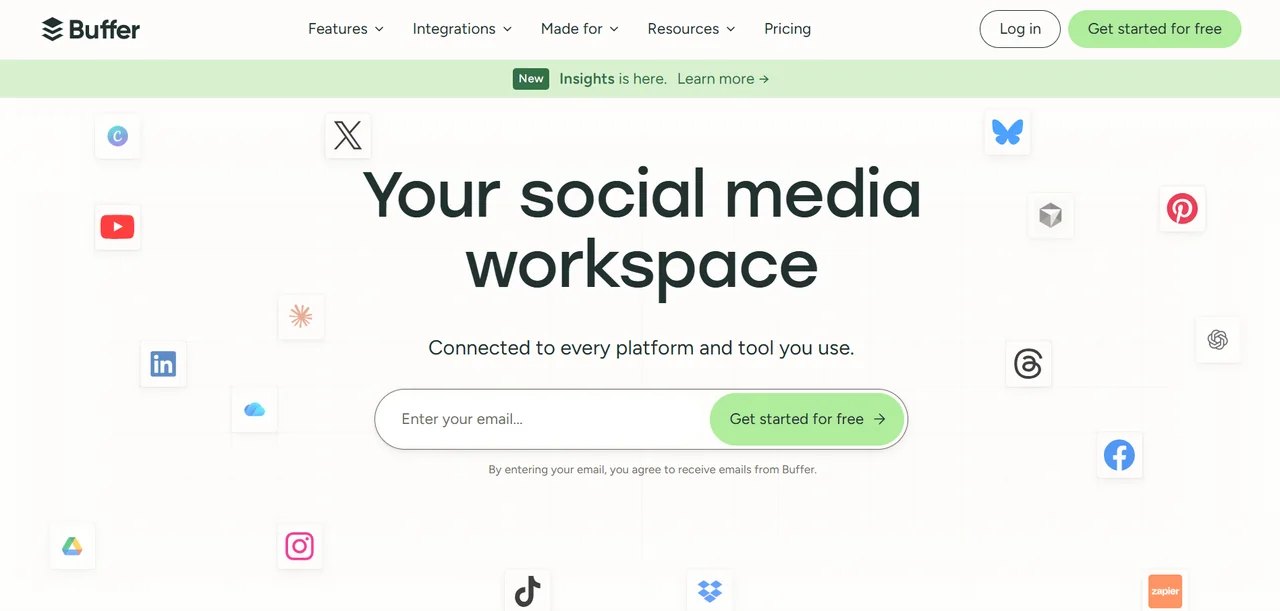
Buffer
Channel logos scattered around an email box. The promise is reach — getting the post out — not making the thing you are posting.
Buffer’s own site, captured 2 August 2026. The screen, and everything on it, belongs to them and not to us.

Later
Read the two buttons: Start your campaign, and Earn as a creator. This is a two-sided influencer marketplace now, with the scheduler as one product inside it.
Later’s own site, captured 2 August 2026. The screen, and everything on it, belongs to them and not to us.
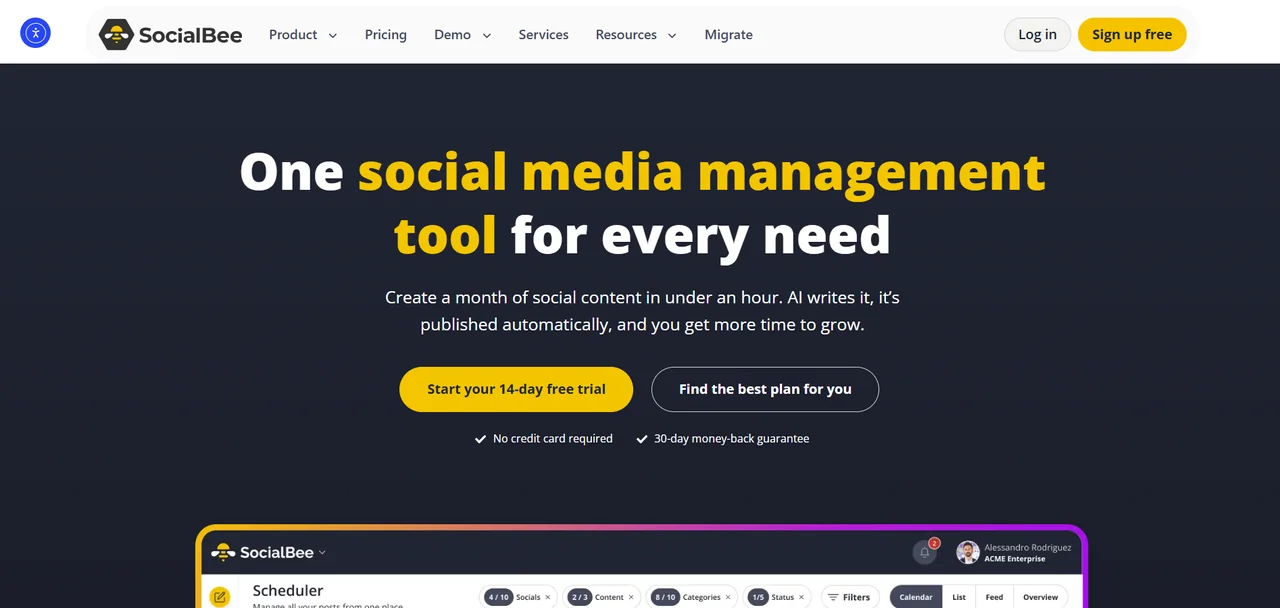
SocialBee
A month of content in under an hour, above a screenshot of a scheduler. The content it means is the words — the picture is still yours to find.
SocialBee’s own site, captured 2 August 2026. The screen, and everything on it, belongs to them and not to us.
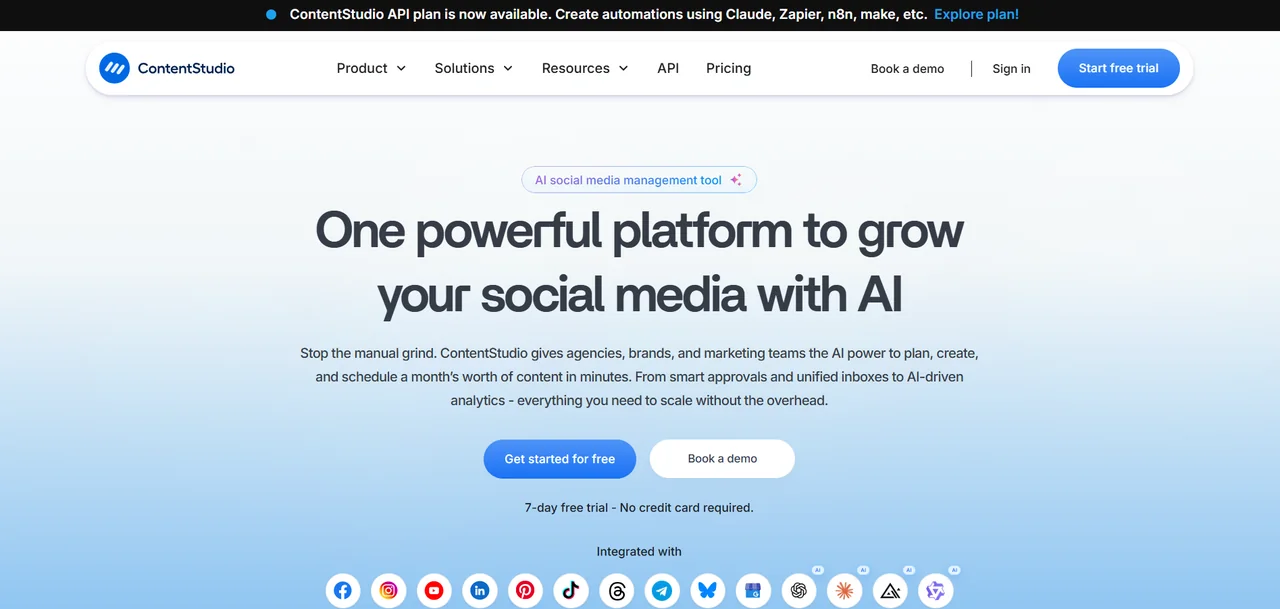
ContentStudio
Agencies, brands and marketing teams, in that order, with approvals and a unified inbox. Built for someone posting on behalf of other people.
ContentStudio’s own site, captured 2 August 2026. The screen, and everything on it, belongs to them and not to us.
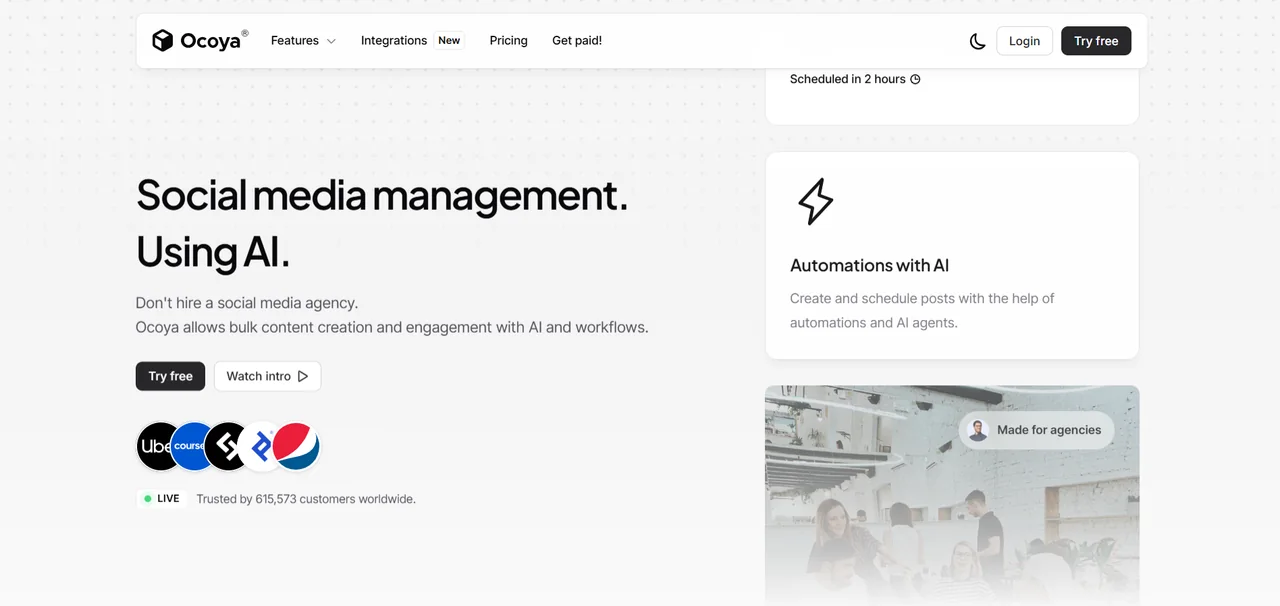
Ocoya
“Don’t hire a social media agency” is the entire pitch, and bulk is the operative word — volume of posts, out of what you already have.
Ocoya’s own site, captured 2 August 2026. The screen, and everything on it, belongs to them and not to us.
Side by side
The same six, on seven questions.
Buffer
- Schedules and publishes
- Yes
- Writes captions
- Yes
- Generates images
- No
- Built around restyling your product photo
- No
- Video
- No
- Multi-client / team workflows
- Limited
- Time from photo to publishable post
- You supply it
Later
- Schedules and publishes
- Yes
- Writes captions
- Limited
- Generates images
- No
- Built around restyling your product photo
- No
- Video
- Limited
- Multi-client / team workflows
- Yes
- Time from photo to publishable post
- You supply it
SocialBee
- Schedules and publishes
- Yes
- Writes captions
- Yes
- Generates images
- Yes
- Built around restyling your product photo
- No
- Video
- No
- Multi-client / team workflows
- Yes
- Time from photo to publishable post
- You supply it
ContentStudio
- Schedules and publishes
- Yes
- Writes captions
- Yes
- Generates images
- Yes
- Built around restyling your product photo
- No
- Video
- No
- Multi-client / team workflows
- Yes — best here
- Time from photo to publishable post
- You supply it
Ocoya
- Schedules and publishes
- Yes
- Writes captions
- Yes
- Generates images
- Yes
- Built around restyling your product photo
- No
- Video
- Yes
- Multi-client / team workflows
- Yes
- Time from photo to publishable post
- Template-based
startposting.
- Schedules and publishes
- No
- Writes captions
- Yes
- Generates images
- Yes
- Built around restyling your product photo
- Yes
- Video
- No
- Multi-client / team workflows
- No
- Time from photo to publishable post
- Seconds
We lose the first row and we lose it badly — five of six publish for you and we do not. Look at the fourth row instead.
The product photo
Your product photo, and what each tool does with it.
Every tool here will take your photo. The schedulers post the photo you give them, and several can generate an image from a prompt instead. Predis.ai goes further: on 17 September 2026 its own site described writing a caption for an image you drop in, placing your images into its post templates, animating a still product shot into a video, and AI product photoshoots. We have not tested the photoshoot feature, so we make no claim about its results.
What we do is narrower. You upload the photograph you took of your product, make three choices, and we restyle the scene around it, with the model held to your product. The image, the headline, the captions, the call to action and the hashtags come back together, sized for the placement. No prompt to write and nothing to lay out.
The whole image is made by AI. It is not a photograph, and any AI model can alter small details such as the lettering on a label — ours included. Check every post before you publish it, the same way you would check a retoucher’s work. A post that shows a product which does not match what arrives costs you more than a quiet week on social.
If Predis already makes posts from your photos that you are happy to publish, that is a good reason to stay. Our side-by-side comparison with Predis.ai goes through the differences in detail.
Made with startposting
What startposting. gives you back.
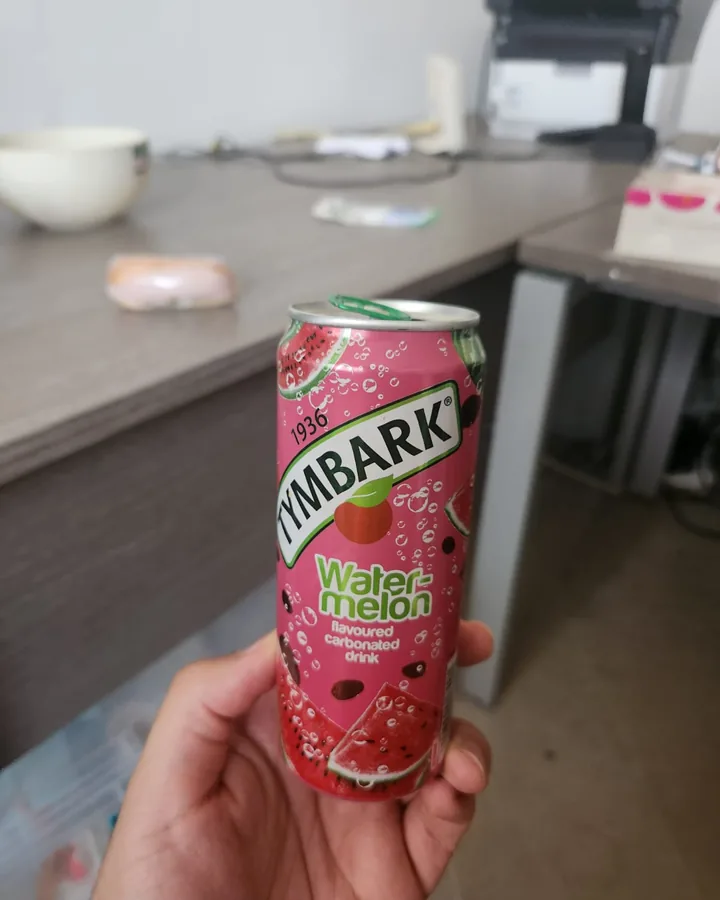
Unedited output from our own tool, not stock and not a mock-up. On the left is what the seller actually uploaded; on the right is what startposting. sent back. Look at the product in each pair — the scene changed around it, and the headline was written to match. The images are made by AI and are not photographs; each took seconds and no prompt.
Before

After — ready to post

caption + hashtags written with the image — nothing left for you to fill in.
Before
After — ready to post

caption + hashtags written with the image — nothing left for you to fill in.
The other answer
When you should just stay on Predis.ai.
A page listing six replacements has every incentive not to write this. Stay where you are if:
- video is a real part of your output — it does video and nothing on this list beats it there, us least of all
- the competitor-analysis feature is something you actually open. That is genuinely uncommon in this category
- publishing to five channels from one place is the workflow, and rebuilding it around two tools would cost you more time than the credits cost you money
- you post about your business rather than about specific physical products — quote cards, tips, announcements. Template and prompt visuals are fine for that, and that is most of what social is
- your bill is predictable at your current volume. The credit complaints cluster around video; if you are not making video, you may never meet the problem
Questions
The things people ask before switching.
What is the best Predis.ai alternative?
It depends what Predis was doing for you, which is why this page is sorted by job rather than ranked. If it was scheduling, Buffer is cheaper and simpler. If it was evergreen rotation, SocialBee. If it was pulling your store catalogue in, Ocoya. If what frustrated you was the images themselves, a scheduler will not fix that; making the post from your own product photo might, and that is what we built.
Is Predis.ai any good?
Yes, and a page pretending otherwise would not be worth reading. It holds 4.7 out of 5 across 186 reviews on Capterra and 4.7 across 105 on G2. Reviewers report saving around ten hours a week on post production. It does video, competitor analysis and publishing to multiple channels, none of which we do at all.
Why do people look for an alternative then?
Two themes recur in published reviews. Credits drain faster than expected once video is involved, so the bill is hard to predict. And the visuals: one Capterra reviewer writes that the images feel low quality and overly AI-generated at times, and that posts and images are very difficult to edit. Another notes the AI crashed after thirty minutes of setup.
Does startposting schedule posts?
No, and that is the biggest thing we do not do. Five of the six tools on this page publish for you and we hand you a file to post yourself. If scheduling is the feature you cannot lose, we are the wrong answer on this page and you should pick one of the others.
What does startposting do differently?
It is built around one job: you upload a product photo, make three choices, and get back a finished post — the scene restyled around your product, plus a headline, captions, a call to action and hashtags, sized for the placement. No prompt, no template to lay out. The image is made by AI and it is not a photograph, so read the label before you post. What we do not do is schedule, publish or make video; the other five tools here schedule, and Predis does all three.
Can I use both?
That is the combination we would actually recommend. Make the posts here, schedule them with Buffer or SocialBee. We are a generator with no calendar; they are calendars with weak generators. Nothing about the two overlaps.
Does Predis.ai use my own product photos?
Yes. When we re-read its own site on 17 September 2026, Predis.ai described writing a caption for an image you drop in, placing your own images into its templates, pulling products from a Shopify or WooCommerce store, animating a still product photo into a video, and AI product photoshoots. We have not tested the photoshoot feature. An earlier version of this page said Predis did not start from your photo; that was wrong, and we corrected it.
Which Predis.ai alternative is best for a small DTC brand?
Decide which part of Predis you relied on. If it was publishing, Buffer or SocialBee. If it was pulling your catalogue in, Ocoya. If it was making the post itself from your product, startposting starts from your product photo and returns the image with the caption and hashtags. We do not schedule, so many small brands pair us with a scheduler.
Keep reading
- startposting vs. Predis.ai — the two compared side by side
- Best Canva alternatives — if a design suite is what you are leaving
- Best Photoroom alternatives — if the image tool is the problem
- Alternatives to hiring a product photographer — what a shoot really costs
- Alternatives to hiring a social media manager — six jobs, and who covers which
- How we use AI, and what it means for your posts
Try it on one product.
Three posts free, no card.
Start freePredis.ai, Buffer, Later, SocialBee, ContentStudio and Ocoya are trademarks of their respective owners. startposting is not affiliated with, endorsed by, or sponsored by any of them, and earns nothing from any recommendation on this page. Ratings and reviewer quotes are from published third-party review sites and reflect information available at the date of publication.